10 — Fallback Install via mcp-remote + Bearer Token
Nội dung này hiện chưa có sẵn bằng ngôn ngữ của bạn.
Walkthrough
Section titled “Walkthrough”Older Claude Desktop builds (before May 2026) don’t have the Add custom
connector UI. For those, the fallback is a JSON config file + mcp-remote
(a stdio→HTTP bridge that runs locally). The token is a long-lived bearer
string minted in the worker admin — no OAuth.
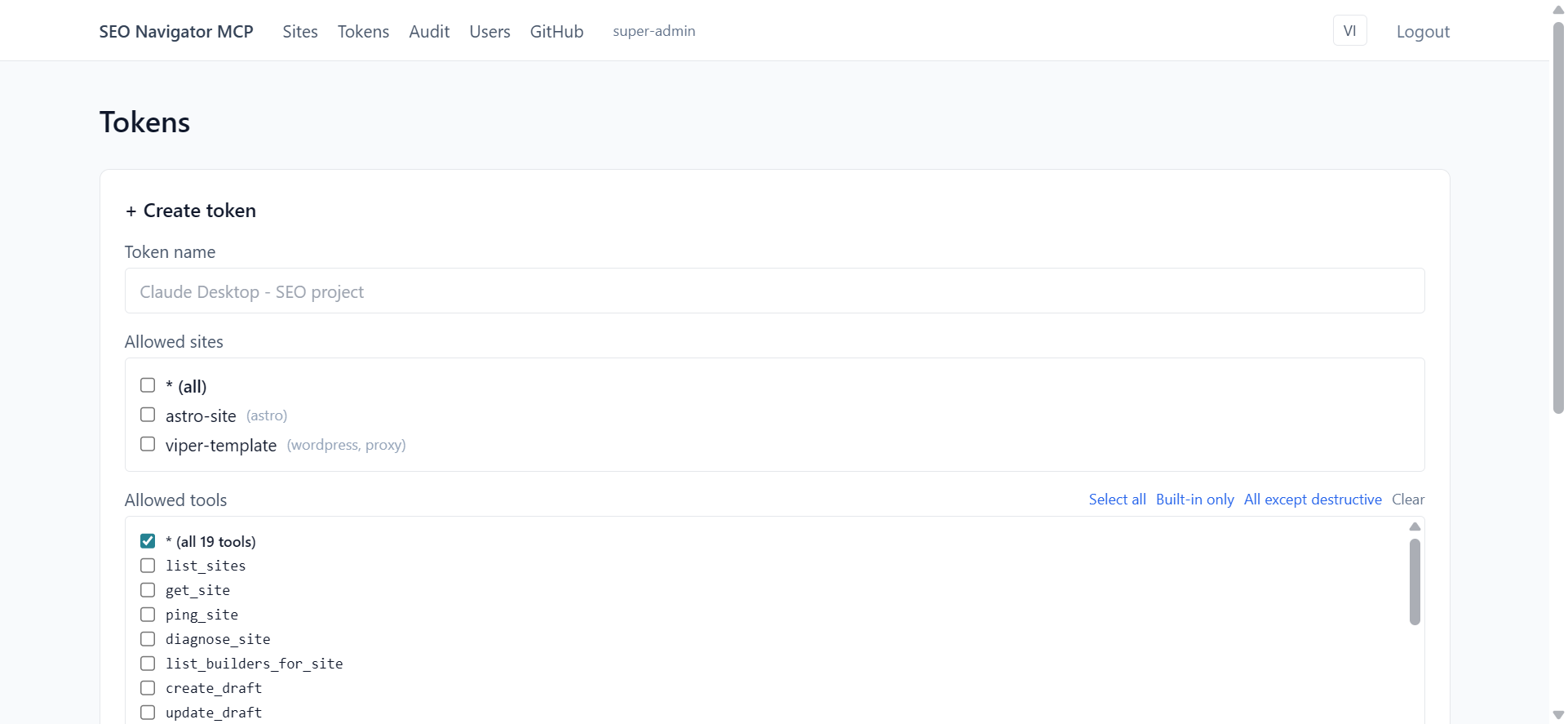
Step 1 — Mint a bearer token
Section titled “Step 1 — Mint a bearer token”In the worker admin:
- Open
https://seo-navigator-mcp.autumn-recipe-cac7.workers.dev/admin/tokens - Click + Create token
- Fill in:
- Name:
Claude Desktop (laptop name) - Allowed sites: tick the sites this token should reach. Quick-pick Select all if you want unrestricted access.
- Allowed tools: quick-pick Select all for full surface, or
All except destructive to exclude proxy
delete-*tools. Super-admin-only tools likedelete_astro_routeare hidden from regular users automatically.
- Name:
- Click Create. The plaintext token is shown once as
sn_prod_<32 hex>— copy it immediately. The worker stores only the SHA-256 hash, so if you lose it, you have to revoke + re-create.
Step 2 — Edit Claude Desktop’s config file
Section titled “Step 2 — Edit Claude Desktop’s config file”| OS | Path |
|---|---|
| Windows | %APPDATA%\Claude\claude_desktop_config.json |
| macOS | ~/Library/Application Support/Claude/claude_desktop_config.json |
If the file doesn’t exist, create it. Paste this (merge with existing
mcpServers if you already have entries):
{ "mcpServers": { "seo-navigator": { "command": "npx", "args": [ "-y", "mcp-remote", "https://seo-navigator-mcp.autumn-recipe-cac7.workers.dev/mcp", "--header", "Authorization:Bearer PASTE_TOKEN_HERE" ] } }}Replace PASTE_TOKEN_HERE with the token from Step 1.
Step 3 — Quit Claude fully
Section titled “Step 3 — Quit Claude fully”Closing the window is not enough — Claude keeps running in the system tray.
- Windows: right-click the Claude icon in the system tray → Quit
- macOS:
Cmd+Qwhile focused, or right-click the Dock icon → Quit
Step 4 — Reopen Claude
Section titled “Step 4 — Reopen Claude”Launch Claude Desktop again. The first startup downloads mcp-remote via
npx (~10–30 seconds — give it time). After that it’s cached.
Open a new chat. The 🔌 icon should show seo-navigator with the tool count.
Why mcp-remote and not direct config?
Section titled “Why mcp-remote and not direct config?”This worker speaks Streamable HTTP (the MCP spec 2025-06-18 transport).
Older Claude Desktop config schemas don’t have a streamable-http type —
they only know command (stdio). mcp-remote is a tiny stdio→HTTP bridge
that runs locally, forwards every JSON-RPC frame to the remote endpoint,
and injects your bearer header along the way.
When Claude Desktop gains native remote HTTP support, you can drop the
mcp-remote shim and use a direct url field. The worker doesn’t change.
When to use OAuth vs bearer
Section titled “When to use OAuth vs bearer”| OAuth Custom Connector | Bearer + mcp-remote | |
|---|---|---|
| Setup | 3 clicks, no config file | Edit JSON config file |
| Requires Node.js on PATH | No | Yes (npx launches mcp-remote) |
| Token rotation | Auto (1h access + 30d refresh) | Manual (revoke + create new) |
| Audit attribution | Per-user (oauth_access_tokens.user_id) | Per-token (tokens.owner_user_id) |
| Per-site scope | Bound to user’s user_sites | Explicit allowed_sites array |
| Best for | Day-to-day Claude Desktop use | CI runners, older Claude builds, scripting |
See Tokens & scoping for a deeper comparison.
Common gotchas
Section titled “Common gotchas”npx: command not foundon macOS — Node not on PATH. Install from nodejs.org, restart your terminal AND Claude Desktop.- First startup very slow —
mcp-remotepackage is downloading. One-time, ~30 seconds. Subsequent startups are instant. - 🔌 shows “Disconnected” — Most often the bearer token has a typo
(missing character, extra space). Re-copy from
/admin/tokensand paste carefully. Bearer tokens are exactlysn_prod_+ 32 hex chars = 40 characters total. - Tool fails with
E_AUTH— Token revoked or doesn’t exist. Mint a new one.
Cover the fallback path for users on Claude Desktop builds without Custom Connector support, or in environments where OAuth roundtrips are blocked (corporate proxies). Uses mcp-remote + a hand-issued bearer token.
Prerequisites
Section titled “Prerequisites”- Node.js 20+ installed on the user’s machine (
node -vworks in a terminal). - An older Claude Desktop build that supports
claude_desktop_config.jsonMCP entries. - Admin access to the SEO Navigator dashboard so we can mint a bearer token.
Setup state
Section titled “Setup state”- Claude Desktop is closed.
- A terminal is open at the user’s home directory.
- A browser tab is open on the admin dashboard Tokens page, signed in.
-
Action: In the admin dashboard, click the indigo + Create token button at the top-right of the Tokens table. Expected: A modal opens with fields for Name, Owner, Scopes (sites + tools), and Expires. Recorder: open the modal slowly and zoom on the scope checkboxes.
-
Action: Fill in:
- Name:
claude-desktop-bearer-trung - Sites: tick the same sites you used in scenarios 02–09.
- Tools: tick All built-in tools (or whichever subset you want to demo).
- Expires: 30 days from today.
Click Create.
Expected: The modal shows the plaintext token once, prefixed
sn_prod_…. A red banner warns that the value won’t be shown again. A Copy button is visible. Recorder: highlight the warning banner — this is the part viewers always miss.
- Name:
-
Action: Click Copy, then close the modal. Expected: The Tokens table now lists the new row with Hash instead of the plaintext, Last used = never. Recorder: confirm the table row appeared.
-
Action: In a terminal, edit Claude Desktop’s config file. On macOS:
Terminal window open -a "TextEdit" ~/Library/Application\ Support/Claude/claude_desktop_config.jsonOn Windows (PowerShell):
Terminal window notepad $env:APPDATA\Claude\claude_desktop_config.jsonExpected: The JSON file opens in the editor. Recorder: show the file path on screen for one second.
-
Action: Add or merge this
mcpServersentry, pasting the token you copied:{"mcpServers": {"seo-navigator": {"command": "npx","args": ["-y","mcp-remote","https://seo-navigator-mcp.autumn-recipe-cac7.workers.dev/mcp","--header","Authorization: Bearer sn_prod_REPLACE_ME"]}}}Save the file. Expected: File saved without parse errors. Recorder: highlight the URL and the token placeholder.
-
Action: Start Claude Desktop. Wait ~10 seconds for the MCP host to spawn
mcp-remote. Expected: Click the 🔌 icon — seo-navigator is listed with the same 31+ built-in tools. Recorder: scroll the tool list as in scenario 02 to confirm parity. -
Action: In a new conversation, type:
List my sites.
Expected: Same result as scenario 02 — Claude calls
list_sitesand returns a table. Recorder: short and tight — the point is “works the same as OAuth, just installed differently”.
Verification
Section titled “Verification”- Admin Tokens page shows Last used = just now on the new bearer row.
- Admin Audit log records the
tools/call list_sitesrow with the token id in the actor column (not an email, because bearer tokens are owned by the user account that minted them but the audit log shows token id rather than full email). - A
pgrep -fa mcp-remote(or Task Manager on Windows) shows the runningmcp-remoteprocess bridging stdio to HTTPS.
Rollback / cleanup
Section titled “Rollback / cleanup”- Quit Claude Desktop.
- Remove the
seo-navigatorentry fromclaude_desktop_config.json. - In the admin Tokens table, click Revoke on the
claude-desktop-bearer-trungrow. - Confirm the audit log records
token.revoked.
Edge cases to capture in the recording
Section titled “Edge cases to capture in the recording”npxnot on PATH: Claude Desktop logscommand not found. Show the user installing Node, restarting Claude.- Token mis-pasted (extra space, missing prefix): the MCP host shows a connection error. The Workers response would be
401withWWW-Authenticatepointing at the OAuth metadata; show the JSON error in the Claude Desktop logs view if available. - Token revoked while in use: the next tool call returns
401. Show Claude reporting the error and the user re-issuing a token.